Technical SEO Audit Checklist: 15 Essential Checks for 2026
This technical SEO audit checklist organizes 15 essential checks for modern websites, covering crawlability, indexing, Core Web Vitals, mobile usability, schema, security, and site architecture.
Technical SEO has a significant impact on the rankings, crawling, indexing, and search performance of a website. But owning a good website doesn’t necessarily help to ensure your content will perform well in search engine results if you have technical issues. This is why performing a technical SEO site audit is crucial to help enhance organic visibility and site health.
A technical SEO audit identifies issues that impact search engines and their users. It enables site owners to address issues concerning crawling, indexing, speed, mobile usability, structured data and site structure.
In 2026, search engines will have even more focus on fast, secure, mobile-friendly, and technically-optimized websites.
What is a Technical SEO Site Audit?
A technical SEO site audit is a website analysis that checks the technical configuration for potential issues that could negatively impact website rankings and visibility.
The audit will be based on:
- Crawlability
- Indexing
- Website speed
- Core Web Vitals
- Mobile optimization
- Internal linking
- Structured data
- HTTPS security
- XML sitemaps
- Broken links
The aim is to ensure that search engines can properly crawl and understand the website.
The first is Google Search Console
One of the most crucial tools for technical SEO audits is Google Search Console.
It helps identify:
- Indexing issues
- Crawl errors
- Mobile usability problems
- Sitemap errors
- Addressing Core Web Vitals problems
- Security problems
Coverage and Pages reports list the pages that are indexed and pages that are not included in search results.
Check Website Crawlability
Bots are used by the search engines to crawl websites. When pages cannot be crawled properly, they can’t be included in Google search results.
There are some critical crawlability tests:
- Robots.txt file
- XML sitemap
- Broken internal links
- Redirect chains
- Crawl depth
Always keep pages that are important to search engine bots accessible.
Analyze Website Indexing
The purpose of indexing is to decide whether or not the pages are displayed in search results.
While conducting a technical SEO audit, look for the following:
- Noindex tags
- Duplicate pages
- Thin content
- Blocked pages
- Orphan pages
Google Search Console can be used to track indexation status and understand which URLs were not indexed.
Check the performance of your website and Core Web Vitals
The speed of the website is directly related to SEO and also user experience. Slower websites tend to have higher bounce rates and lower engagement rates.
Useful tools include:
- Google PageSpeed Insights
- GTmetrix
Analyze:
- Largest Content FFP Paint (LCP)
- First Input Delay (FID)
- Cumulative Layout Shift (CLS)
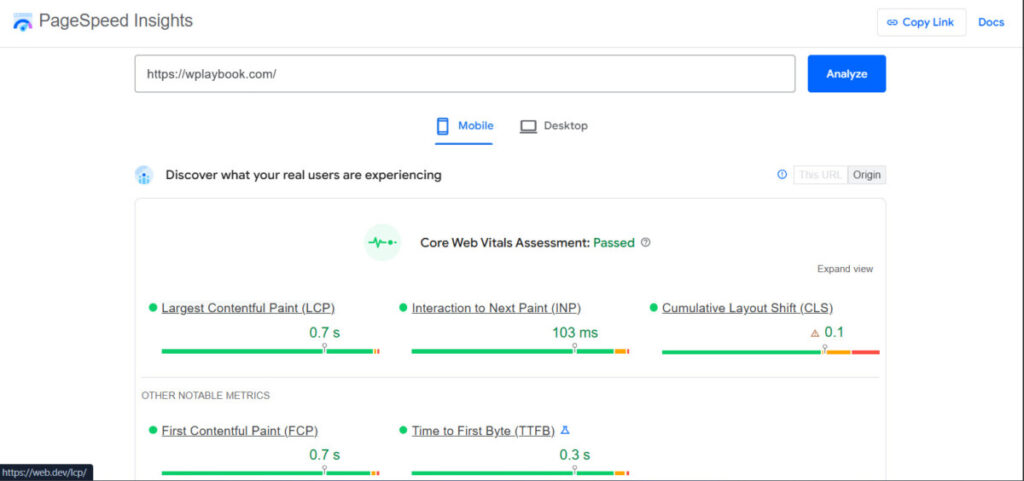
The enhancements of Core Web Vitals are a vital aspect of contemporary technical search engine optimization.
Check Mobile Optimization
Google’s mobile-first indexing means they are primarily going to look at the mobile version of a website.
Check:
- Responsive design
- Mobile loading speed
- Font readability
- Touch-friendly buttons
- Mobile usability issues
If people aren’t having a good experience on your mobile site, it could have a negative impact on your rankings.
Review HTTPS Security
A secure website will be encrypted with HTTPS, which helps to boost both SEO and user trust.
Check for:
- SSL certificate issues
- Mixed content warnings
- The browser is not redirection properly or back to the origin page.
Google sees HTTPS as a measure of security and reliability for websites.
Check the website’s internal linking structure
Internal links are important for the internal organization of the website and for distributing its authority between the pages.
During a technical SEO audit, the following should be identified:
- Broken internal links
- Orphan pages
- Redirect loops
- The anchor text is not used effectively.
Good internal linking enhances topical authority and crawlability.
Find and Repair Broken Links
404 errors negatively impact user experience and rob of crawl budget.
Use tools like:
- Screaming Frog SEO Spider
- Ahrefs Broken Link Checker
to identify:
- 404 pages
- Broken internal links
- Broken external links
Accurate link fixing enhances Search engine optimization and usability.
Audit XML Sitemap
An XML sitemap enables search engines to find important pages effectively.
Check that:
- The sitemap is updated
- Only important urls provided
- Pages that are broken are removed
- Google Search Console will accept sitemap.
Having a neat sitemap speeds up the crawler.
Check Schema Markup and Structured Data
Schema markup ensures that search engines understand the content on a webpage better.
Audit schema for:
- Errors
- Missing fields
- Incorrect schema types
Useful tools include:
- Google Rich Results Test
- Schema.org
Schema markup is the key for having rich results and AI search visibility.
Must Read this detailed Blog on Schema Markup: How to Use Schema Markup for AI Search Optimization?
Understand Duplicate Content Issues
Duplicate content can lead to a loss in the ranking potential and a confusion of search engines.
Check for:
- Duplicate titles
- Duplicate meta descriptions
- Similar content pages
- Canonical tag problems
The preferred page version can be suggested using canonical tags.
Review URL Structure
SEO-friendly URLs enhance the crawlability and user experience.
Good URLs should:
- Be succinct and descriptive.
- Include keywords naturally
- Avoid unnecessary parameters
- Replace underscores with hyphens: e.g. change “on-going” to “ongoing”.
Simple URL structures assist search engines to make better sense of content.
Learn how to audit the basics of on-page SEO
There is some overlap between technical and basic on page optimization as well.
Check:
- Missing title tags
- Missing meta descriptions
- Incorrect heading structure
- Missing image alt text
- Thin content pages
All these aspects help in the optimization of search visibility and content organization.
Utilize SEO Audit Tools for quicker analysis
There are a number of tools that can automate technical SEO audits:
- Semrush Site Audit
- Ahrefs Site Audit
- Screaming Frog SEO Spider
These tools instantaneously detect technical problems and offer recommendations.
Identify High Impact SEO Problems
Not all problems need to be addressed now. Pay attention to problems related to:
- Crawlability
- Indexing
- Page speed
- Mobile usability
- User experience
When these high impact technical issues can be resolved, they can yield the quickest SEO boost.
Carry out regular Technical SEO Audits
Technical SEO isn’t something that happens once and is done forever. Web pages evolve, and new problems may crop up as time goes on.
Regular audits contribute to maintaining:
- Website health
- Search visibility
- SEO performance
- User experience
The technical SEO audit is a common practice performed by many websites, typically every few months.
Conclusion
It is important to know how to perform a technical SEO site audit to enhance website rank and health. Technical SEO enables search engines to crawl, index, and understand the websites correctly and enhances the user experience.
Understanding crawlability, indexing, Core Web Vitals, mobile optimization, schema markup, and internal linking can help website owners optimize their site and identify and fix issues that impact SEO performance.
Strong technical SEO is still one of the most crucial building blocks to long-running organic growth in 2026.
What is a technical SEO site audit?
A technical SEO audit examines website issues concerning crawling, indexing, speed and SEO performance.
What is the best technical SEO audit instrument?
Some of the more popular SEO audit tools include Google Search Console, Screaming Frog, Ahrefs, and Semrush.
Why is technical SEO important?
Technical SEO enhances the efficiency with which search engines can crawl and index websites and boost their ranking and user experience.
When to conduct Technical SEO Audits?
Routine audits should be carried out on most websites every couple of months or after significant changes to a website have been made.
Is website speed a factor in SEO ranking?
Yes, the Core Web Vitals and page speed do directly affect the performance of SEO and user engagement.
You may also like
by Google AdSense

Issac Lee is the founder of WPlaybook and Statistics Playbook, a data analytics education brand. Since 2021, he has built and operated online businesses, produced more than 500 videos, and created and sold courses and digital content in collaboration with companies. He currently manages the development, SEO, and content operations of more than 40 business websites and specialist blogs. His work focuses on WordPress funnels, technical SEO, content strategy, community-led monetization, and sustainable online business.
View all posts by Issac Lee