
What Is Schema Markup? Configure Rank Math sameAs in WordPress
You may be active on YouTube, Instagram, Threads, a community, and an external blog—but does a search engine know that all of those channels belong to the same brand?
A person may immediately recognize that the WPlaybook website and its @wplaybook accounts share one owner. A search engine cannot always confirm that relationship from a similar name and logo alone.
As a result, the brand signals you build across multiple channels can remain disconnected. Skipping sameAs does not cause an immediate ranking penalty, but it can mean missing a clear opportunity to identify those official profiles as one entity.
The more channels you operate, the more useful that clarification becomes. It can also help search and AI systems distinguish your official accounts from unrelated brands or unofficial profiles with a similar name.
This is where the sameAs property in schema markup helps. It tells machines, “These URLs are also official pages representing this person or organization.”
This guide shows how to configure Rank Math sameAs settings in WordPress, connect your official channels without editing theme code, and verify the public JSON-LD output.
What is sameAs schema markup?
According to the Schema.org definition, sameAs is the URL of another webpage that unambiguously indicates the identity of an item. For a brand website, it can connect official social profiles, communities, author pages, and other authoritative profiles.
Google also supports multiple sameAs URLs in Organization structured data. These identifiers can help Google distinguish your organization from other entities with similar names. See Google’s Organization structured data documentation for the supported properties and recommendations.
{
  "@type": "Organization",
  "name": "WPlaybook",
  "url": "https://wplaybook.com/",
  "sameAs": [
    "https://www.youtube.com/@wplaybook",
    "https://www.instagram.com/wplaybook/",
    "https://www.threads.com/@wplaybook",
    "https://community.wplaybook.com/",
    "https://blog.naver.com/wplaybook"
  ]
}
In this example, the website is the canonical brand URL and the five addresses in the sameAs array are official WPlaybook channels.
Which WPlaybook channels are connected?
WPlaybook website
Role: canonical brand website
URL: https://wplaybook.com/
YouTube
Role: official WordPress and SEO video channel
URL: https://www.youtube.com/@wplaybook
Instagram and Threads
Role: official social profiles
URLs: https://www.instagram.com/wplaybook/ and https://www.threads.com/@wplaybook
WPlaybook Community
Role: first-party community operated by the brand
URL: https://community.wplaybook.com/
Naver Blog
Role: official external publishing channel
URL: https://blog.naver.com/wplaybook
The community is a subdomain, but it is also a distinct official service, so it is included. An external profile such as Naver Blog can also be appropriate when it clearly represents the same brand.
Which URLs should you add?
Good candidates
- Official YouTube, Instagram, Threads, LinkedIn, or similar profiles managed by the brand
- A first-party community or official secondary blog
- An authoritative profile that clearly establishes the company or author’s identity
- Public pages that are actively maintained and accessible without logging in
URLs to avoid
- An article that merely mentions the brand
- Partner, client, or affiliate websites owned by someone else
- An unrelated account with the same name
- Abandoned profiles that are no longer official
- Individual posts, event pages, or tracking and shortened URLs
The goal is not to collect as many links as possible. Ask whether each URL clearly represents the same person or organization. Rank Math’s sameAs documentation likewise recommends relevant, trustworthy online profiles.
How to configure sameAs in Rank Math
First confirm that Rank Math’s Schema module is enabled. Then go to:
Rank Math SEO → Titles & Meta1. Define the primary entity in Local SEO
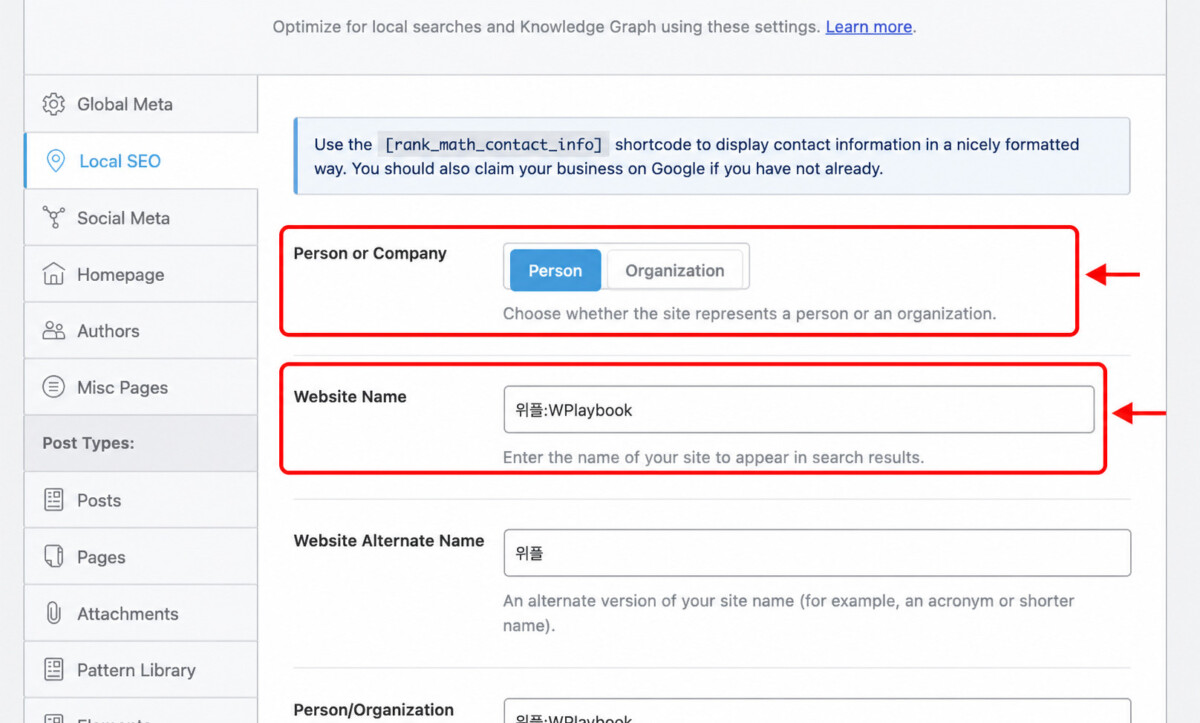
Open Titles & Meta → Local SEO. Choose whether the site represents a person or an organization. This becomes the basis for the Knowledge Graph and schema entity Rank Math generates.
Organization is usually the natural choice for a company, group, publication, or multi-author brand. Person can suit a site where an individual expert is the brand. WPlaybook currently uses an owner-led brand configuration.
- Person or Company: choose the entity that actually operates the site
- Website Name: the official name used in search
- Website Alternate Name: a recognized abbreviation or shorter brand name
- Person/Organization Name: the official name of the primary entity
- Logo: a crawlable, square brand image
- URL: the canonical homepage URL
2. Add URLs under Social Meta → Additional Profiles
Open Titles & Meta → Social Meta. The Additional Profiles field is where Rank Math collects URLs for the Organization or Person schema’s sameAs property.
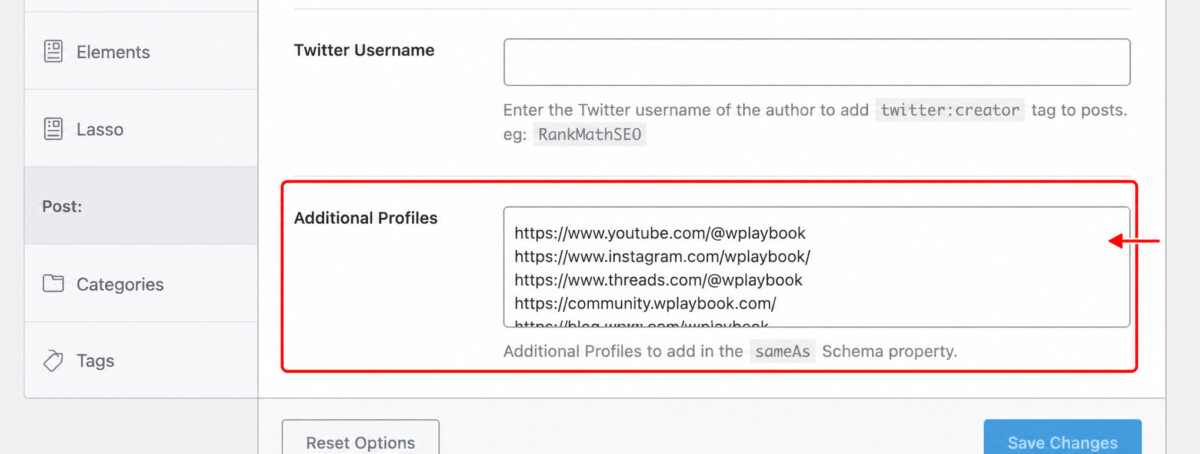
Enter one URL per line. Use the final homepage or profile URL, without post paths or tracking parameters.
https://www.youtube.com/@wplaybook
https://www.instagram.com/wplaybook/
https://www.threads.com/@wplaybook
https://community.wplaybook.com/
https://blog.naver.com/wplaybook
Rank Math’s Titles & Meta documentation explains that Additional Profiles are used for the Organization schema’s sameAs property.
3. Save and clear caches
- Click Save Changes at the bottom of the Rank Math screen.
- Purge your WordPress page cache.
- Clear the CDN cache if you use one.
- Check the homepage source while logged out.
If the setting changed in WordPress but old JSON-LD remains in the public source, caching is the most likely cause. On WPlaybook, we saved Rank Math, purged WordPress and FlyingPress caches, and then verified the public homepage.
How to verify that sameAs is public
Inspect the page source
Open the homepage source and search for sameAs. The official profiles should appear as an array inside Rank Math’s application/ld+json script.
- Is the array inside the primary Person or Organization entity?
- Are all intended URLs present?
- Are there typos, duplicates, or tracking parameters?
- Does each URL open a real, public official profile?
Use validation tools
- Google Rich Results Test
- Schema.org Validator
- URL Inspection in Google Search Console
Valid structured data does not guarantee a specific rich result or Knowledge Panel. Google’s general structured data guidelines make clear that correct markup does not guarantee a particular search appearance.
SEO benefits and limitations of sameAs
What it can support
- Clarify that the website and official channels represent one brand
- Help distinguish your entity from sites and accounts with similar names
- Provide consistent identifiers when systems interpret the organization and its content
- Organize brand name, URL, logo, and official profiles around one entity
- Help search and AI systems interpret relationships among your channels
What it does not guarantee
- An immediate ranking increase
- An automatically generated Google Knowledge Panel
- Every official account appearing in branded search results
- Citations in AI Overviews or other AI search products
- A direct increase in an independent “E-E-A-T score”
sameAs is not a standalone ranking trick. It is foundational entity data that helps machines understand who operates the site and which profiles officially represent that entity.
Strengthen the signal beyond schema markup
- Use a consistent brand name across channels.
- Keep logos and profile images recognizably consistent.
- Add the official website URL to each profile bio.
- Link visibly from the website to official channels.
- Update Rank Math when a canonical profile URL changes.
- Do not include inactive accounts simply to make the list longer.
A relationship declared in structured data becomes more consistent when the homepage and official profiles also link to one another visibly.
A warning for WP-CLI updates
If you manage many sites, WP-CLI can inspect or update Rank Math settings efficiently. Be careful: Titles & Meta values may be stored together in a single option array.
Replacing the entire option without reading it first can damage unrelated title, robots, or entity settings.
- Read the existing Rank Math option.
- Back it up before making changes.
- Merge new URLs while preserving current profiles and settings.
- Clear caches.
- Verify the public JSON-LD, not only the database value.
Rank Math’s internal storage can change across versions. Base any command on the settings currently deployed on the live server rather than copying a command from another site.
Final checklist
sameAs schema markup connects an official website, social accounts, blogs, and communities as one brand entity. It will not raise rankings overnight, but its value grows as your brand operates across more channels.
List the official profiles you actively manage. Confirm the primary entity under Rank Math SEO → Titles & Meta → Local SEO, then add one official URL per line under Social Meta → Additional Profiles.
Finally, purge caches and verify the sameAs array in the public JSON-LD. That last check confirms that the setting is not merely saved in WordPress—it is visible to search engines.
You may also like
by Google AdSense

Issac Lee is the founder of WPlaybook and Statistics Playbook, a data analytics education brand. Since 2021, he has built and operated online businesses, produced more than 500 videos, and created and sold courses and digital content in collaboration with companies. He currently manages the development, SEO, and content operations of more than 40 business websites and specialist blogs. His work focuses on WordPress funnels, technical SEO, content strategy, community-led monetization, and sustainable online business.
View all posts by Issac Lee


![[2025 Updated] How to Search for Copyright-Free Images (The Proper Way to Use Google Image Search)](https://wplaybook.com/wp-content/uploads/2024/05/copyright-free-image-search-768x432.jpg "[2025 Updated] How to Search for Copyright-Free Images (The Proper Way to Use Google Image Search) 8")


